Steering and pedals by feel
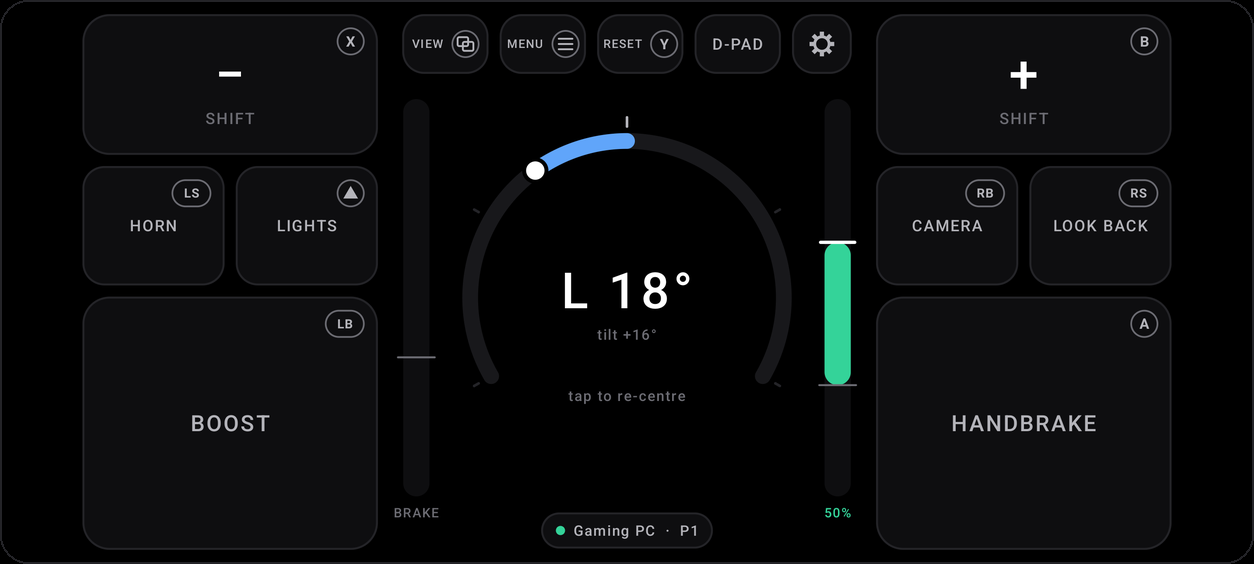
Turn the phone to steer and tilt it for gas or brake. Tune the lock, deadzones, curve and smoothing with a live view of what the game gets.
Free for Windows, Linux and Steam Deck
Turn it to steer, tilt it for gas and brake. Your PC sees an Xbox controller, so any racing game that takes one just works.
Android 13 or newer, on the same network as your PC.
Left stick +0.00
RT 0.00
LT 0.00
125 updates a second · Up to four phones · No account
Motion for everything continuous. Buttons for everything else.
Turn the phone to steer and tilt it for gas or brake. Tune the lock, deadzones, curve and smoothing with a live view of what the game gets.
Handbrake, boost, paddles (or the volume keys), horn, lights and camera. Each shows the Xbox button it presses, so “press A” is easy to find.
Kerbs, slides and crashes come through the phone's motor, lifted so the faint ones can still be felt.
Each phone is its own controller, for split screen. Make anyone Player 1 in one tap, and turn any phone off from your PC.
A D pad and A, B, X and Y for the game's menus. Swipe the middle of the screen, or just lay the phone flat.
Fold it to pause the game. Half fold it into a cockpit, with the dashboard on top and the buttons under your thumbs.
Two minutes, once.
After that, open Wheel and drive.
Run Wheel.exe on Windows, or one line in a terminal on Linux. It waits quietly in the background.
Point your phone's camera at the code in Wheel's window. The app opens and connects, or is offered if you don't have it yet.
Tap the dial in your driving position, then start a race.
Wheel for PC is free.
Pick your system.
You're on your phone. Wheel for PC goes on the computer you play on, so open wheel.ranax.co there.
It installs itself just for you, offers to set up the controller driver, and waits by the clock. If Windows says it protected your PC, click More info, then Run anyway: Wheel is new, so Windows hasn't seen many people run it yet.
curl -fsSL https://wheel.ranax.co/install.sh | shIt installs just for you, without root, and needs a 64 bit PC with Python 3.9 or newer. If Steam isn't installed, Wheel asks once for your password so games can see its controllers. Rather not pipe to a shell? Get wheel-linux.tar.gz and run sh wheel/install.sh.
curl -fsSL https://wheel.ranax.co/install.sh | shSteam's own settings already let Wheel make controllers, so there's nothing else to set up. Turn on Start Wheel when you log in in its window, and it keeps running in Game Mode too.
Wheel for Android needs Android 13 or newer, on the same network as your PC.
Any PC game with Xbox controller support, on Windows or Linux. It's been tested with Assetto Corsa and slowroads.io, and its buttons start out the way Forza Horizon expects. For Assetto Corsa, set the input to X360.
Yes. Games see a standard Xbox 360 controller, so Steam, Proton and native games all take it. Rumble works too.
No. The phone talks only to your PC, over your own network. No accounts, no ads, no analytics. See the privacy policy.
Only phones you allow. A new phone waits until you click Allow on the PC, unless it scanned the code on your screen. Every phone your PC knows is listed in Wheel's window, where you can turn it off, forget it or block it.
Android phones on Android 13 or newer. Any phone with motion sensors steers; one with a gyroscope steers more smoothly. There's no iPhone app yet.
It's the next best thing you already own. The steering has no force feedback, but the game's rumble comes through, and the phone sends its controls 125 times a second.
On Windows, uninstall Wheel from Settings, Apps, like any other app. On Linux, run sh ~/.local/share/wheel/install.sh --uninstall.